Presenting Your Brand with a Realistic 3D Facade Sign Mockup
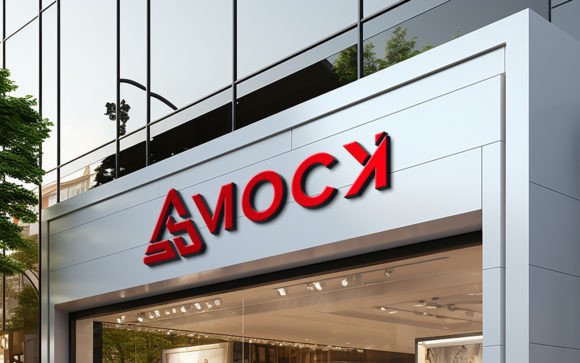
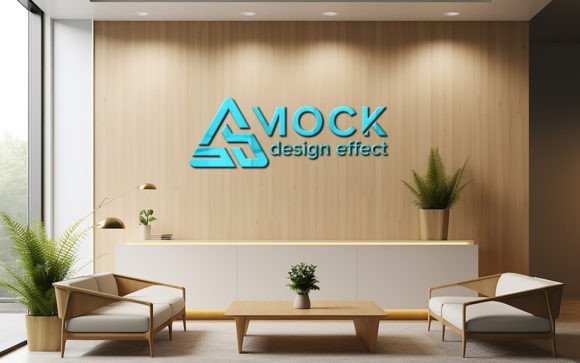
Visualizing how a brand identity translates from a digital screen to the physical world is one of the most challenging aspects of graphic design and client presentation. A Realistic 3D Facade Sign Brand Mockup serves as a critical bridge in this process, allowing designers, architects, and business owners to preview signage installations with photorealistic accuracy. Unlike flat two-dimensional renderings, these mockups utilize advanced lighting, shadow mapping, and perspective distortion to simulate how a logo or text will appear on a building’s exterior under natural conditions.
The primary value of this tool lies in its ability to provide immediate visual feedback without the cost and labor of physical prototyping. By leveraging smart object technology, users can replace placeholder designs with their own assets, automatically generating correct shadows and lighting effects. This capability ensures that the final presentation looks authentic, helping stakeholders make informed decisions about material choices, placement, and overall aesthetic impact before any fabrication begins.
Understanding the Technology Behind Smart Object Replacement
The core functionality of a high-quality facade sign mockup relies on Photoshop’s smart object feature. This technology allows for non-destructive editing, meaning the original template remains intact while the user’s design is seamlessly integrated. When you open the provided PSD file, you will find specific layers designated for content replacement. By double-clicking these smart objects, you can insert your logo, typography, or custom graphics. Upon saving, the main document updates instantly, applying complex transformations that mimic real-world physics.
This automation is particularly valuable for professionals who may not possess advanced 3D modeling skills. Traditional 3D rendering requires specialized software and a steep learning curve to manage light sources, texture mapping, and camera angles. In contrast, a pre-built mockup handles these technical elements behind the scenes. The result is a 100% editable file where the lighting and shadows adjust dynamically to match the contours of the sign and the surrounding architecture. This ensures that even users with minimal technical expertise can produce studio-quality visuals that look like professional photographs.
Comparing Mockups to Traditional Rendering and Physical Prototypes
When evaluating methods for presenting signage concepts, it is essential to weigh the benefits of digital mockups against traditional rendering and physical prototypes. Each approach offers distinct advantages depending on the project’s stage and budget.
- Digital Mockups: These are ideal for rapid iteration and client approvals. They offer high visual fidelity at a fraction of the cost of physical builds. A Realistic 3D Facade Sign Brand Mockup allows for quick changes to colors, fonts, and materials, making it easy to explore multiple design directions in a single session.
- Custom 3D Rendering: While highly flexible, custom rendering requires significant time and expertise. It is best suited for large-scale architectural projects where every angle and environmental factor must be precisely controlled. For standard signage presentations, the overhead may not be justified.
- Physical Prototypes: Building a actual sign provides the most accurate representation but is prohibitively expensive for early-stage design. It is typically reserved for final validation before mass production or installation.
For most branding and design scenarios, digital mockups strike the optimal balance between realism and efficiency. They provide enough detail to assess visual impact while remaining flexible enough to accommodate last-minute revisions. The inclusion of high-resolution textures and 300 DPI output ensures that these files are suitable for both web presentations and print portfolios.
Evaluating Quality and Usability Features
Not all mockup templates are created equal. When selecting a resource, several key features determine its effectiveness and ease of use. A premium quality mockup should be fully layered and well-organized, with clear folder structures that guide the user through the editing process. This organization reduces the time spent searching for specific elements and minimizes the risk of accidental edits to critical lighting or background layers.
Another crucial factor is resolution. A 300 DPI pack ensures that the final image retains sharpness and detail, even when viewed at full size or printed in large formats. Lower resolution files may appear pixelated or blurry, undermining the professionalism of the presentation. Additionally, the realism of the lighting and shadows plays a pivotal role. High-quality mockups use ambient occlusion and directional lighting to create depth, making the sign appear integrated into the building’s facade rather than simply pasted on top.
The ease of editing is also a significant consideration. The best tools require no special skills beyond basic familiarity with Photoshop. By simply replacing the logo within the smart object, users can achieve a polished result. This accessibility makes such mockups valuable for freelancers, small agencies, and in-house marketing teams who need to produce high-quality visuals quickly without relying on external 3D artists.
Best-Fit Situations and Limitations
Understanding when to use a facade sign mockup helps maximize its utility. These tools are particularly effective for:
- Client Presentations: Showing a logo on a building helps clients visualize their brand in a real-world context, increasing confidence and approval rates.
- Portfolio Development: Designers can showcase their work in a professional manner, demonstrating how their designs function in physical spaces.
- Marketing Materials: High-quality images can be used in social media campaigns, websites, and brochures to promote a new business location or rebranding effort.
However, there are limitations to consider. Mockups are static representations and may not capture dynamic lighting conditions throughout the day. They also rely on predefined angles and perspectives, which may not match every unique architectural scenario. If a project requires a specific viewpoint not covered by the template, custom 3D modeling may be necessary. Furthermore, while the lighting is realistic, it is simulated. Subtle nuances of material reflectivity or weathering may not be perfectly replicated, so it is important to manage client expectations regarding the final physical product.
Making an Informed Decision
Choosing the right visualization tool depends on your specific needs, budget, and timeline. For most branding and signage projects, a Realistic 3D Facade Sign Brand Mockup offers the best combination of speed, quality, and cost-effectiveness. It eliminates the need for expensive physical prototypes while providing a level of realism that flat designs cannot achieve. The ability to edit designs effortlessly via smart objects empowers users to iterate quickly and present multiple options without additional labor costs.
When evaluating options, prioritize templates that offer high resolution, organized layers, and realistic lighting effects. Check for user reviews and ratings to ensure the file performs as advertised. A well-rated mockup saves time and reduces frustration, allowing you to focus on creativity rather than technical troubleshooting. Remember that the goal is to communicate your design intent clearly and convincingly. By selecting a tool that balances ease of use with professional output, you can enhance your presentations and make more informed decisions about your brand’s physical presence.
Ultimately, the value of a mockup lies in its ability to bridge the gap between concept and reality. It provides a safe, cost-effective environment for experimentation and validation. Whether you are a seasoned designer or a business owner exploring branding options, incorporating high-quality 3D mockups into your workflow can significantly improve the clarity and impact of your visual communications. Take the time to explore different styles and angles, and do not hesitate to rate and review resources that prove helpful, contributing to a broader community of informed users.