Blank 3D T-Shirt Mockup Guide
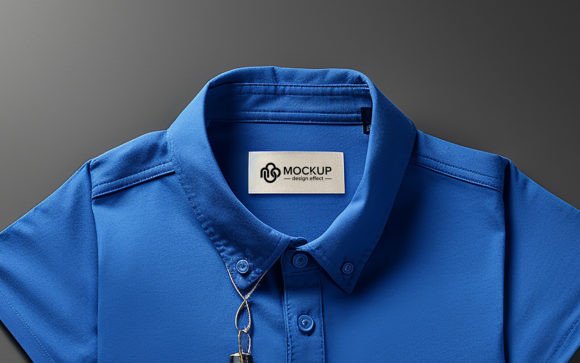
In the visual economy of modern design, presentation is often just as critical as the creation itself. A brilliant graphic can fall flat if displayed on a distorted or low-resolution image, while a simple, well-executed logo can command attention when showcased on a realistic, high-quality garment. This is where the Blank 3D T-Shirt becomes an indispensable asset for creators. It serves not merely as a background, but as a digital canvas that bridges the gap between abstract artwork and tangible product reality.
Using a dedicated mockup allows designers, marketers, and entrepreneurs to visualize their concepts in a real-world context before committing to physical production. Whether you are preparing a portfolio piece, pitching a client, or launching an e-commerce store, the ability to present your design on a crisp, three-dimensional surface adds a layer of professionalism that flat images simply cannot match.
The Power of Realistic Presentation
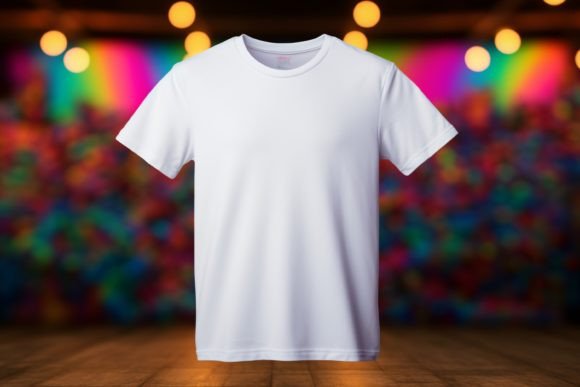
The primary value of a Blank 3D T-Shirt lies in its neutrality and depth. Unlike complex scenes with distracting backgrounds or models, a clean, isolated shirt focuses the viewer’s eye entirely on the artwork. The "3D" aspect refers to the lighting, shadows, and fabric folds that give the image volume. These subtle details trick the brain into perceiving texture and weight, making the digital file feel like a physical object.
When you use a high-resolution file, such as one with 3000×2000 px dimensions at 300 DPI, you ensure that every curve of the fabric and every shadow fold is rendered with precision. This resolution is crucial for print-ready presentations or high-definition web displays. It allows you to zoom in without losing clarity, ensuring that your potential clients or customers see the quality they can expect from the final product.
Creative Applications for Designers and Artists
For graphic designers and illustrators, this type of mockup is a versatile tool for portfolio development. Instead of showing a static PNG of a logo, you can demonstrate how it interacts with the contours of a garment. Here are several ways to leverage this resource:
- Portfolio Enhancement: Replace flat exports with mocked-up shirts to show versatility. It demonstrates that you understand how designs translate to merchandise.
- Client Pitches: When presenting concepts to clients, a realistic mockup helps them visualize the end result. It reduces ambiguity and speeds up the approval process.
- Social Media Content: High-quality visuals perform better on platforms like Instagram and Pinterest. A clean t-shirt mockup provides a consistent aesthetic for your feed.
- Print-on-Demand Previews: If you sell designs online, using a standardized mockup ensures all your products look cohesive, building brand trust.
The key is to treat the mockup as a stage for your art. Because the shirt is blank and neutral, it does not compete with your design. Instead, it supports it, allowing colors and shapes to pop against the white or light-colored fabric.
Technical Workflow: From Download to Display
One of the most appealing aspects of using a JPG-based mockup system is its accessibility. You do not need complex 3D modeling software or advanced rendering skills. The process is straightforward and efficient, designed for quick iteration.
- Download the File: Obtain the high-resolution JPG file. Ensure you are working with the full 3000×2000 px version to maintain quality.
- Open in Your Editor: Launch Photoshop or any other image editing application that supports layers. While PSD files are common for mockups, a high-res JPG offers flexibility for simpler workflows.
- Place Your Design: Import your artwork (PNG with transparent background works best) and place it on top of the t-shirt image.
- Adjust for Realism: Use blending modes like "Multiply" or "Overlay" to let the fabric texture show through your design. Adjust opacity and add slight warping if necessary to match the shirt’s folds.
- Export and Share: Save your final composition. The RGB Color profile ensures vibrant colors on screens, making it ideal for digital marketing.
This streamlined workflow allows for rapid prototyping. You can test five different color variations or logo placements in the time it would take to print a single sample. This efficiency is vital for freelancers and small business owners who need to move quickly.
Tailoring the Approach for Different Audiences
Different users have different goals, and the Blank 3D T-Shirt can be adapted to meet various needs. Understanding your audience helps you decide how to style and present the final image.
For E-Commerce Entrepreneurs
If you are selling apparel, consistency is key. Use the same mockup angle and lighting for every product in your store. This creates a clean, organized storefront that looks professional and trustworthy. Focus on clear visibility of the design, ensuring no shadows obscure important details.
For Marketing Agencies
Agencies often need to create campaign visuals quickly. A high-quality mockup allows you to insert client logos onto apparel for promotional materials, event swag previews, or employee uniform concepts. The high 300 DPI Resolution ensures these images can be used in both digital ads and printed brochures.
For Educators and Hobbyists
Teachers and hobbyists can use these mockups to teach design principles or experiment with new styles. It provides a safe, cost-free environment to learn about placement, scale, and color theory. Students can see immediate results from their adjustments, reinforcing learning through visual feedback.
Maintaining Quality and Originality
While mockups are powerful tools, overuse can lead to a generic look. To keep your work original and effective, consider these best practices:
Customize the Lighting: Even with a static JPG, you can adjust brightness and contrast to match the mood of your design. A dark, edgy graphic might benefit from higher contrast, while a pastel design may look better with soft, even lighting.
Pay Attention to Scale: Ensure your design is proportionate to the shirt. A logo that is too small gets lost; one that is too large looks amateurish. Use the natural folds of the 3D shirt as guides for placement.
Keep It Clean: Avoid cluttering the image with unnecessary elements. The strength of a Blank 3D T-Shirt is its simplicity. Let the design speak for itself. If you must add text or graphics around the shirt, keep them minimal and complementary.
Conclusion
The Blank 3D T-Shirt is more than just a digital file; it is a bridge between concept and reality. By providing a high-resolution, realistic foundation, it empowers creators to present their work with confidence and clarity. Whether you are a seasoned designer refining your portfolio or an entrepreneur launching your first product line, leveraging this tool can elevate your visual communication.
Remember, the goal is not just to display a design, but to tell a story about how that design lives in the real world. With the right approach, a simple mockup can transform a good idea into a compelling visual narrative that resonates with your audience. Download the file, open your editor, and start creating visuals that truly stand out.